
Turtle Zone Indicator
Turtle Zone is a proprietary indicator created by trader Andrey Yard (original script on TradingView).
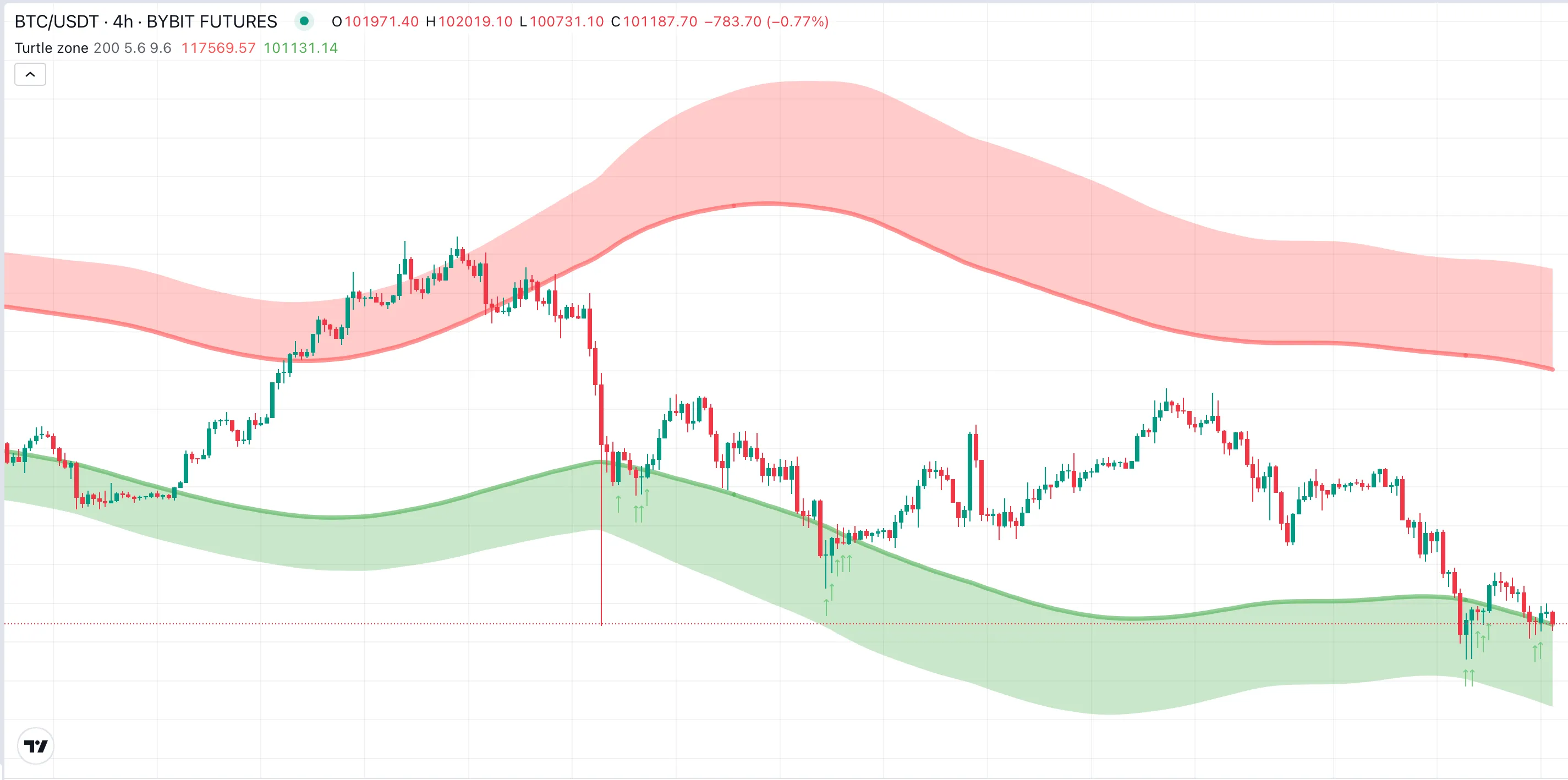
It builds an adaptive price channel that automatically widens or narrows depending on the current market volatility. When the market is calm, the zones become narrower. When volatility rises and price movement intensifies, the channel expands — clearly showing where the “safe boundaries” of price movement lie.
Principle
Section titled “Principle”The idea behind Turtle Zone is based on observing how price behaves around the market’s average equilibrium. Unlike static indicators that use a fixed channel width, Turtle Zone dynamically adjusts its boundaries according to the volatility of the asset.
- The upper zone represents an overbought area, where the price has moved too far above the norm.
- The lower zone represents an oversold area, where the price has dropped too far and a rebound becomes more likely.
- The wider the zones, the higher the market turbulence. The narrower they are, the more stable the market.
In essence, the indicator helps visualize market context — whether the asset is in a calm phase, an impulse, overheated, or in deep correction.
Signal Interpretation
Section titled “Signal Interpretation”| Event | Meaning | Possible Action |
|---|---|---|
| Price touches the lower zone | Asset is oversold, potential rebound upward | Long |
| Price touches the upper zone | Asset is overbought, possible pullback | Short |
| Breakout above outer zone | Start or continuation of a bullish trend | Confirm Long |
| Breakout below outer zone | Downtrend strengthening or reversal phase | Confirm Short |
| Price returns inside the band | Momentum fading, consolidation phase | Pause / Take profit |
How to Use Turtle Zone with Veles Bots
Section titled “How to Use Turtle Zone with Veles Bots”1. Entry by Reversion Zones (Mean Reversion)
Section titled “1. Entry by Reversion Zones (Mean Reversion)”- Add a filter: Turtle Zone.
- Combine it with filters like
RVI,CCI, orATR%to avoid false entries.
2. Entry by Breakout (Trend Continuation)
Section titled “2. Entry by Breakout (Trend Continuation)”- Add a filter: Turtle Zone.
- Enable the Reverse Signal option.
- Combine with
RVI,CCI, orATR%to filter weak breakouts.
3. Exit by Breakout (Trend Continuation)
Section titled “3. Exit by Breakout (Trend Continuation)”- Configure Exit by Signal: — if price breaks above the upper boundary, close Short, — if price breaks below the lower boundary, close Long.
- Set a minimum P&L (e.g. ≥ 0.3%) to prevent premature exits.
Example Combinations
Section titled “Example Combinations”- Turtle Zone + ADX — filters only strong trends, excludes flat markets.
- Turtle Zone + RVI Levels — provides precise entry timing when the impulse and zone align.
- Turtle Zone + CMO or CCI — helps identify whether a move is a pullback or a continuing impulse.
Advantages
Section titled “Advantages”- Adapts to volatility — the channel “breathes” with the market.
- Combines reversal and trend continuation logic in one tool.
- Resistant to market noise due to built-in smoothing.
- Works on any timeframe — from 5-minute to daily charts.
Summary
Section titled “Summary”The Turtle Zone indicator is a modern evolution of the Mean Reversion Channel concept — it combines average deviation logic, adaptive volatility, and advanced smoothing (Ehlers method).
It helps visualize not just the direction of movement but the risk boundaries — showing where an asset is truly overheated or undervalued.
On the Veles.Finance platform, Turtle Zone can be used as:
- an entry filter based on reversion zones,
- an exit signal upon channel breakout,
- or a component in a multi-filter setup with ADX, RVI, and ATR%.
See also: