
General Information
Filters, or indicators, are parameters that Veles bots use to decide whether to open, average, or close a deal. Each indicator is calculated using its own formula based on historical data: price, volume, or a combination of both. The set of filters on our platform is constantly expanding.
Using filters, you can:
- find overbought and oversold points for an asset,
- track breakouts of levels and channel boundaries,
- take trading volume into account,
- monitor price and its changes.
Example:
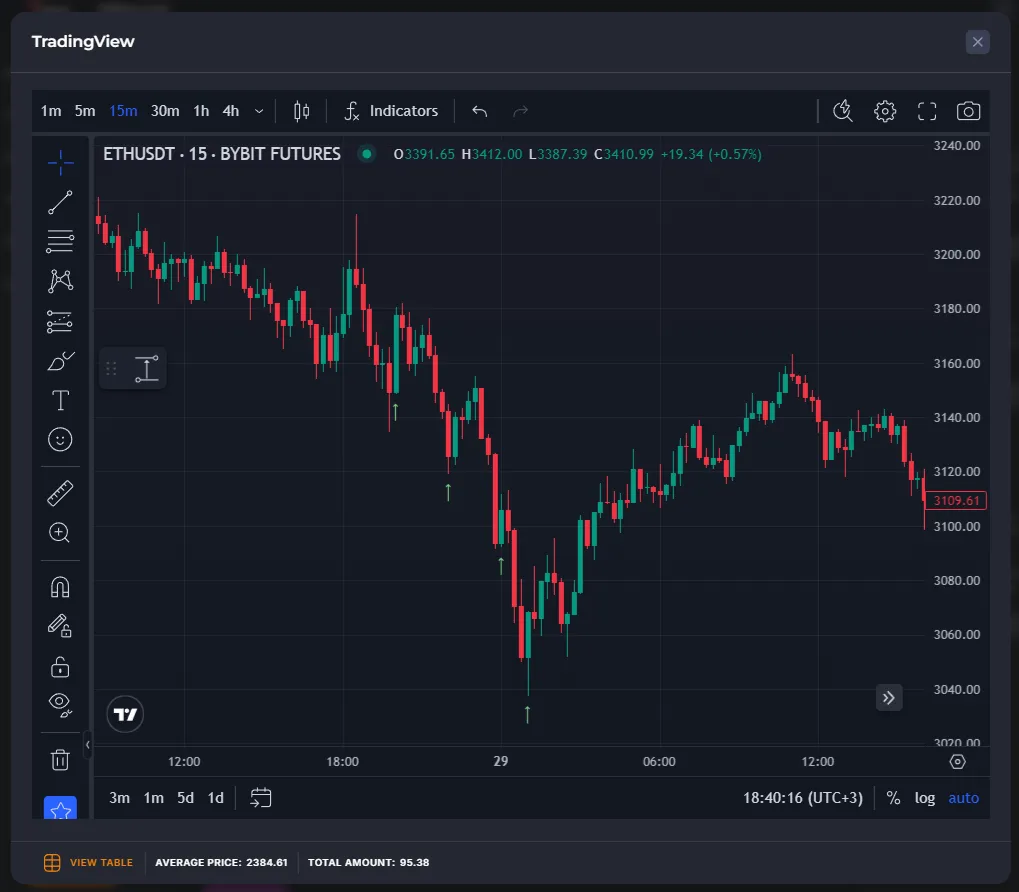
- Configure the bot in Long to open a deal using the channel indicator Bollinger Bands on a 1-hour timeframe.
- Press “Calculate”, then “Show signals”.
- Review the entry points on the chart (green arrows):
Ready-made filter sets
Section titled “Ready-made filter sets”If you’re a beginner, start with the templates: Conservative, Moderate, Aggressive. These pre-selected indicators must all match to allow a trade to be opened.
Detailed help for each filter is available in the bot editor — click the ”?” button.
Bot without filters
Section titled “Bot without filters”You can create a bot that doesn’t use entry filters. Such a bot opens a new trade immediately after closing an old one. ⚠ This is a risky option and is not recommended for beginners.
Why filters are important:
- They prevent opening a trade “at the highs” (for example, opening a long trade at the peak of a pump).
- Without a filter, the bot can get into a prolonged investment and freeze its deposit.
- Averaging and stop-loss orders often don’t help in such cases.
- Filters reduce the number of unsuccessful entries and make trading more predictable.
Multiple Filter Processing Rules
Section titled “Multiple Filter Processing Rules”If multiple filters are set, the bot waits for their signals to fully match. The order in which they are displayed in the editor is irrelevant: the check proceeds from higher timeframes to lower ones.
Calculation Methods
Section titled “Calculation Methods”The platform offers two indicator calculation methods. The choice depends on your strategy.
1. At bar closing
Section titled “1. At bar closing”- The calculation is performed based on the closed candle.
- If the condition is met at the close, the bot will open a deal on the next candle.
- This method is more reliable and produces fewer false signals.
2. Once per minute
Section titled “2. Once per minute”- The check is performed within the candle once per minute, regardless of its timeframe.
- Can generate multiple opposing signals on the same timeframe.
- Mainly suitable for channel indicators (Bollinger Bands, Keltner Channel, % Price Change, etc.).
Reverse signal
Section titled “Reverse signal”Some indicators have an option that reverses the logic of operation.

An example of a “direct” signal:
- In the group of conditions for trade start, in the Long bot, the indicator “Bollinger Bands” gives a signal when the candle crosses the lower channel boundary.
- In the group of conditions for exiting the trade with Take Profit, in the Long bot, the “Bollinger Bands” indicator gives a signal when the candle crosses the upper channel boundary.
- In the group of conditions for exiting the trade at Stop Loss, in the Long bot, the indicator “Bollinger Bands” gives a signal when the candle crosses the lower channel boundary.
If you turn on the “Reverse signal”, the logic of the indicator is reversed:
- In the group of conditions for trade start, in the Long bot, the reverse “Bollinger Bands” indicator gives a signal when the candle crosses the upper channel boundary.
- In the group of conditions for exiting the trade with Take Profit, in the Long bot, the reverse “Bollinger Bands” indicator gives a signal when the candle crosses the lower channel boundary.
- In the group of conditions for exiting the trade at Stop Loss, in the Long bot, the reverse “Bollinger Bands” indicator gives a signal when the candle crosses the upper channel boundary.
Check the indicator’s logic with backtests to better understand their mechanics.